In How to Use Symantec IT Management Suite to Remediate Against BlackLotus – Part 1: Reporting, I describe how these minimum BIOS requirements can be integrated into Symantec IT Management Suite reporting. This approach helps you identify systems that are out of compliance and prepares the groundwork for targeted remediation.
In Part 2 of this blog post, we build on the report created in Part 1 by extending it with additional Secure Boot–related information. Using Custom Inventory, we collect all the required data to gain full visibility into the Secure Boot configuration of our devices.
This extended dataset enables more detailed reporting and provides the foundation for assessing compliance and planning further remediation steps.
Enable using Symantec IT Management Suite
Create a new Dataclass with the attributes listed below to store the required Information.

Create a new Run Script Task and make sure you have selected Powershell Windows as Script type. Copy the provided Powershell Script below and run the Script on a few Devices to make sure everthing works as expected.
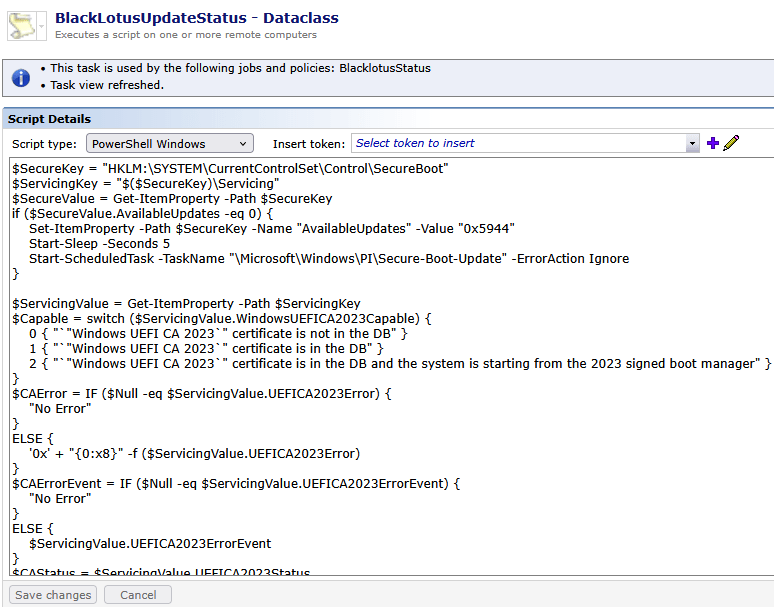
This PowerShell script is designed to initiate, monitor, and report the status of Microsoft Secure Boot servicing, with a focus on the Windows UEFI CA 2023 certificate transition.
$SecureKey = "HKLM:\SYSTEM\CurrentControlSet\Control\SecureBoot"
$ServicingKey = "$($SecureKey)\Servicing"
$SecureValue = Get-ItemProperty -Path $SecureKey
if ($SecureValue.AvailableUpdates -eq 0) {
    Set-ItemProperty -Path $SecureKey -Name "AvailableUpdates" -Value "0x5944"
    Start-Sleep -Seconds 5
    Start-ScheduledTask -TaskName "\Microsoft\Windows\PI\Secure-Boot-Update" -ErrorAction Ignore
}

$ServicingValue = Get-ItemProperty -Path $ServicingKey
$Capable = switch ($ServicingValue.WindowsUEFICA2023Capable) {
    0 { "`"Windows UEFI CA 2023`" certificate is not in the DB" }
    1 { "`"Windows UEFI CA 2023`" certificate is in the DB" }
    2 { "`"Windows UEFI CA 2023`" certificate is in the DB and the system is starting from the 2023 signed boot manager" }
}
$CAError = IF ($Null -eq $ServicingValue.UEFICA2023Error) {
    "No Error"
}
ELSE {
    '0x' + "{0:x8}" -f ($ServicingValue.UEFICA2023Error)
}
$CAErrorEvent = IF ($Null -eq $ServicingValue.UEFICA2023ErrorEvent) {
    "No Error"
}
ELSE {
    $ServicingValue.UEFICA2023ErrorEvent
}
$CAStatus = $ServicingValue.UEFICA2023Status
$AvailableUpdates = '0x' + "{0:x8}" -f ($SecureValue.AvailableUpdates)

$Errormessage = switch ($CAErrorEvent) {
    1032 { "The Secure Boot update was not applied due to a known incompatibility with the current BitLocker configuration." }
    1033 { "Potentially revoked boot manager was detected in EFI partition. For more information, please see https://go.microsoft.com/fwlink/?linkid=2169931" }
    1034 { "Secure Boot Dbx update applied successfully" }
    1036 { "Secure Boot Db update applied successfully" }
    1037 { "Secure Boot Dbx update to revoke Microsoft Windows Production PCA 2011 is applied successfully." }
    1043 { "Secure Boot KEK update applied successfully" }
    1044 { "Secure Boot DB update to install Microsoft Option ROM UEFI CA 2023 certificate applied successfully" }
    1045 { "Secure Boot DB update to install Microsoft UEFI CA 2023 certificate applied successfully" }
    1795 { "The system firmware returned an error <firmware error code> when attempting to update a Secure Boot variable. For more information, please see https://go.microsoft.com/fwlink/?linkid=216993" }
    1796 { "The Secure Boot update failed to update a Secure Boot variable with error <error code>. For more information, please see https://go.microsoft.com/fwlink/?linkid=2169931" }
    1797 { "The Secure Boot Dbx update failed to revoke Microsoft Windows Production PCA 2011 as the Windows UEFI CA 2023 certificate is not present in DB." }
    1798 { "The Secure Boot Dbx update failed to revoke Microsoft Windows Production PCA 2011 as boot manager is not signed with the Windows UEFI CA 2023 certificate" }
    1799 { "Boot Manager signed with Windows UEFI CA 2023 was installed successfully" }
    1801 { "See EventViewer with Event ID 1801" }
    1808 { "See EventViewer with Event ID 1808" }
    Default { "" }
}

#Send Regkeys to Altiris
#************************DO NOT EDIT********************************
$nse = new-object -comobject Altiris.AeXNSEvent
$nse.priority = 1
$nse.To = "{1592B913-72F3-4C36-91D2-D4EDA21D2F96}"
#************************DO NOT EDIT********************************
#Modify this varaible with the custom data class guid
$objDCInstance = $nse.AddDataClass("{your Dataclass Guid}")
$objDataClass = $nse.AddDataBlock($objDCInstance)

$objDataRow = $objDataClass.AddRow()
$objDataRow.SetField(0, $AvailableUpdates)
$objDataRow.SetField(1, $CAStatus)
$objDataRow.SetField(2, $CAError)
$objDataRow.SetField(3, $Capable)
$objDataRow.SetField(4, $CAErrorEvent)
$objDataRow.SetField(5, $ServicingValue.WindowsUEFICA2023Capable)
$objDataRow.SetField(6, $Errormessage)


$nse.sendqueued()
Its primary goals are:
- To trigger Secure Boot updates when required
- To determine the system’s readiness and progress for the UEFI CA 2023 migration
- To capture firmware- and OS-level errors
- To report the collected information to Altiris for enterprise-wide visibility
Script behavior and workflow
1. Secure Boot registry inspection and update trigger
The script first reads Secure Boot–related registry values.
If no Secure Boot update is currently pending, it explicitly sets the AvailableUpdates flag and starts the Microsoft Secure Boot Update scheduled task.
This ensures the system attempts to apply required Secure Boot database updates (DB, DBX, KEK).
2. Secure Boot servicing status evaluation
After triggering (or skipping) the update request, the script reads the Secure Boot Servicing registry key to evaluate:
- Whether the Windows UEFI CA 2023 certificate is present in the Secure Boot database
- Whether the system is already booting with a 2023-signed boot manager
- The current Secure Boot servicing status
This allows the script to identify systems that are not yet compliant, partially updated, or fully transitioned.
3. Error detection and interpretation
The script checks for Secure Boot–related error values:
- Firmware error codes (formatted as hexadecimal)
- Secure Boot servicing event IDs
If errors are present, the script maps these low-level codes to human-readable explanations, including known issues such as BitLocker incompatibilities, firmware failures, or successful application of Secure Boot database updates.
4. Data preparation and reporting
All collected values (update flags, capability state, status, error codes, and descriptive messages) are packaged into a custom Altiris data class.
The script then sends this data to Altiris using the Altiris Notification Server Event (NSE) COM interface.
This enables:
- Identification of systems that require remediation or firmware updates
- Centralized monitoring of Secure Boot update progress
- Compliance reporting for the Windows UEFI CA 2023 transition
Reporting
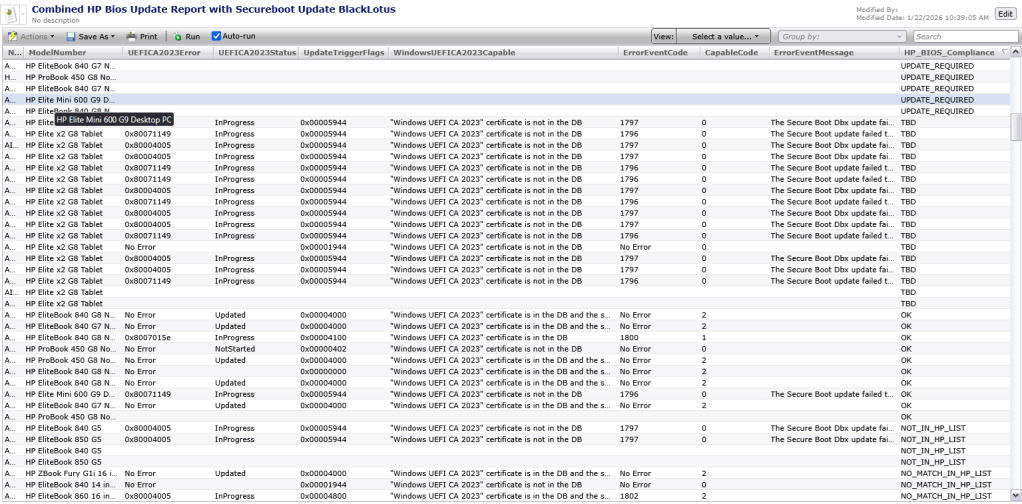
We used the report created in Part 1 and extended this report with Information captured using custom Inventory. In this Report we can see a clear status of each device for the SecureBoot update combined with the BIOS Status (Update_Required, TBD, OK and NOT in the Vendor list).
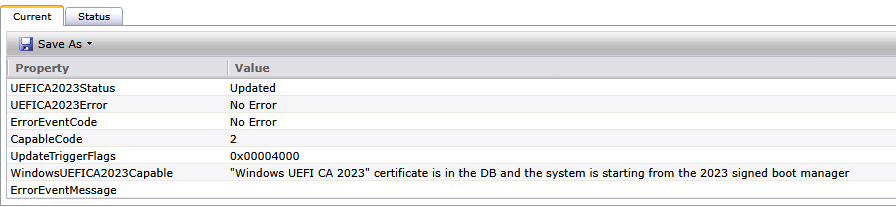
Single Device
checking on a specific device. Double click on a device and click on View -> Inventory -> Inventory -> Custom -> Dataclass name provided when creating the Dataclass.
Creating Filters
You can create Filters based on the captured Information using the Powershell Script.
This filters can be used to target specific Jobs and Tasks or Policies.
Conclusion
Symantec IT Management Suite (ITMS) once again proves why it is a powerful platform, particularly when it comes to flexibility and reporting in enterprise environments. By leveraging Symantec ITMS Custom Inventory, organizations gain a highly adaptable way to report on Secure Boot as well as many other hardware, firmware, and operating system–level attributes with precision and clarity.
Rather than relying on static reports or fragmented data sources, Symantec ITMS provides deep visibility into the actual state of endpoints — including BIOS, firmware, Secure Boot, configuration, and compliance data. Even more importantly, these insights can be directly translated into targeted remediation actions, ensuring that findings are not limited to reporting but lead to measurable operational improvements.
Across both security-critical and day-to-day IT operations, Symantec ITMS delivers real value: visibility, control, and action — all within a single platform. This makes Symantec ITMS not just a reporting solution, but a central enabler for automation, compliance, and efficient endpoint management at scale.
References
Secure Boot Certificate updates: Guidance for IT professionals and organizations
Registry key updates for Secure Boot: Windows devices with IT-managed updates

 Endpoint Management